TPMS and CAN settings: Unterschied zwischen den Versionen
André (Diskussion | Beiträge) (Die Seite wurde neu angelegt: „'''Up on version 2.2.2<sup>1</sup> I-BUS app was able to perform functions of TPMS (Tire Pressure Measurement System) app.'''<br /> '''This is necessary becaus…“) |
(kein Unterschied)
|
Version vom 12. Mai 2026, 10:54 Uhr
Up on version 2.2.21 I-BUS app was able to perform functions of TPMS (Tire Pressure Measurement System) app.
This is necessary because the TPMS receiver and the Resler module use the same USB chip—but the TPMS app cannot distinguish between the module and the TPMS.
In addition to the Resler module (which displays data from the I-BUS), the I-BUS app can now also display data from the CAN BUS that is updated much more quickly if the optional Interface is installed.
More information about the different interfaces: Comparison of interfaces
1No release date has been announced yet for version 2.2.2 [required for both TPMS and the CAN interface!]. You can request a beta version by emailing info@ibus-app.de.
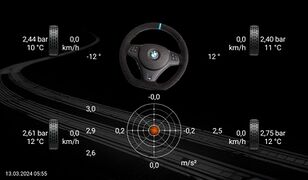
Bewegungsdaten

Inhaltsverzeichnis
TPMS
To ensure that the TPMS readings display correctly - when used in conjunction with the orange Resler module - the original TPMS app have to be uninstalled.
We've tested this till now with Xtrons TPMS07 and TPMS08 only.
TPMS set up
- Plug the TPMS receiver into an available USB port on the radio
- Open the I-BUS app ==> General Settings
- Tap “TPMS USB Interface” and select the interface that appears
- A message saying “Connected to TPMS” should appearn

TPMS USB Interface

Display TPMS values and settings
To display the TPMS values:
- Open the left menu (tap the three lines in the top-left corner or swipe from the left edge toward the center)
- Scroll down to “Motion Data” and select it
- Tire pressure and temperature values are displayed on the outside next to the wheels2
Tap one of the front tires to open the TPMS settings.
Available settings includes:
- TPMS alarm on/off
- High pressure warning
- Low pressure warning
- High temperature warning
- Pressure and temperature units

Navigationsmenü - Bewegungsdaten
Bewegungsdaten

TPMS Einstellungen


2 Wheel speed, steering angle3, and acceleration values are displayed only when an additional CAN bus interface is used!
Teaching/Replacing TPMS sensors
Currently the beta version does not support this feature yet. We are still working on it.
For more information on this topic, visit our other wiki: Programming TPMS Sensors
Values via CAN-Bus interface
With the additional CAN bus interface, the I-BUS app can display additional values from the significantly faster CAN bus. The values here are updated approximately every 10–200 ms (5–100 values per second, depending on the value and the control unit).
IMPORTANT: CAN Interface was an additional interface and do NOT replace Resler Modul!
Comparison of interfaces

CAN-Bus Interface

Anschluss des CAN-Bus Interface
Alle Infos zum Anschluss sind hier aufgeführt:
Einbauanleitung CAN-Bus Interface
Einrichtung des CAN-Bus Interfaces
Zunächst wird das Interface wie oben stehend angeschlossen.
- CAN-Bus Interface an einen freien USB Port vom Radio stecken
- I-BUS App öffnen ==> allg. Einstellungen
- "CAN USB Interface" antippen und das angezeigte Interface auswählen
- es sollte eine Info "Verbunden mit CAN BUS" erscheinen
CAN-Bus Interface
Auswahl der zu zeigenden Parameter via CAN BUS
Zur Auswahl stehen (je nach Fahrzeug, Ausstattung und Motorisierung) folgende Werte:
- Drehzahl
- Geschwindigkeit
- Momentan-Verbrauch
- km-Stand
- Tankinhalt
- Kühlmitteltemperatur
- Öltemperatur (nur M52TU, M54 und S54)
- Drehmoment
- Leistung
- Außentemperatur
- Lenkwinkel3
- Längs- und Querbeschleunigung4
- Anzeige der aktuellen Fahrstufe/des aktuellen Gangs5 sowie Zustand der WÜK6
Ausgewählt werden können diese wie folgt:
- I-BUS App öffnen
- Bordcomputer Einstellungen
- CAN-Bus Daten
- gewünschte Werte anhaken und mit "ok" bestätigen
Hinweis: Werte von CAN überschreiben Werte von DeepOBD (und Werte von DeepOBD überschreiben Werte vom I-BUS)
Neben der Werten kann unter "CAN-Bus Aktualisierungsrate" eingestellt werden wie "schnell" die Werte aktualisiert werden sollen.
Entweder immer sofort wenn ein neuer Wert ankommt - oder besser lesbar aller 100ms oder noch langsamer.
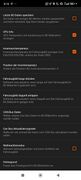
CAN-Bus Interface
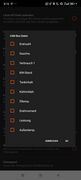
CAN-Bus Interface

CAN-Bus Interface


Raddrehzahlen, Lenkwinkel, Beschleunigungen und Gang-Anzeige via CAN
Um die Werte via CAN zu sehen:
- linkes Menü öffnen (die 3 Striche links oben antippen oder linken Rand zur Mitte ziehen)
- zu "Bewegungsdaten" hinunter scrollen und dies auswählen
- Anzeige der Bewegungsdaten: Raddrehzahlen, Lenkwinkel3 und Beschleunigungen
Der aktuelle Gang/Fahrstufe wird auf dem BC-Bildschirm unten links neben Datum/Uhrzeit eingeblendet.
Navigationsmenü - Bewegungsdaten
Bewegungsdaten
Hinweis: Reifendruck- und Temperatur kommt via TPMS, nicht über das CAN Interface!
3 Lenkwinkel kann nur bei Fahrzeugen mit DSC gezeigt werden!
4 Bei älteren BMW E38 kann trotz DSC ggf. keine Beschleunigung gezeigt werden.
5 Die Info zur Fahrstufe (Automatikgetriebe) wird vom Tacho hinterlegt. Der aktuelle Gang (Schaltgetriebe) wird über eine hinterlegte Tabelle aus Drehzahl, Geschwindigkeit und Signal vom Kupplungsschalter ermittelt. Ggf. sind nicht alle Motorisierungen und Getriebeübersetzungen hinterlegt.
6 Es gibt folgende Status der WÜK (Wandler-Überbrückungs-Kupplung):
- "-" WÜK geschlossen
- "|" WÜK offen
- "~" WÜK im Schleifpunkt
Hinweis: Werte der Reifendrücke und -temperaturen benötigen ein TPMS System!
